Games
Games  Sign in
  Sport
Sport  Promotions










Drakaris Casino Login and Registration in Australia
Signing up here takes 3 minutes. Australians need to join the site before playing demo mode or real-money games. There are many other features for users to access after completing the Drakaris registration, such as the profile and Wallet management, the VIP Club and Flames of Fortune access. You can get a welcome bonus, reloads and cashback.
You can only create one account. Violating this term and other conditions can lead to account suspension and loss of your winnings. Casino Drakaris uses SSL encryption to encrypt your data. On this page, you will learn how to sign up, log in, verify or delete your profile and solve login issues.
How to Create Your Account at Drakaris Casino
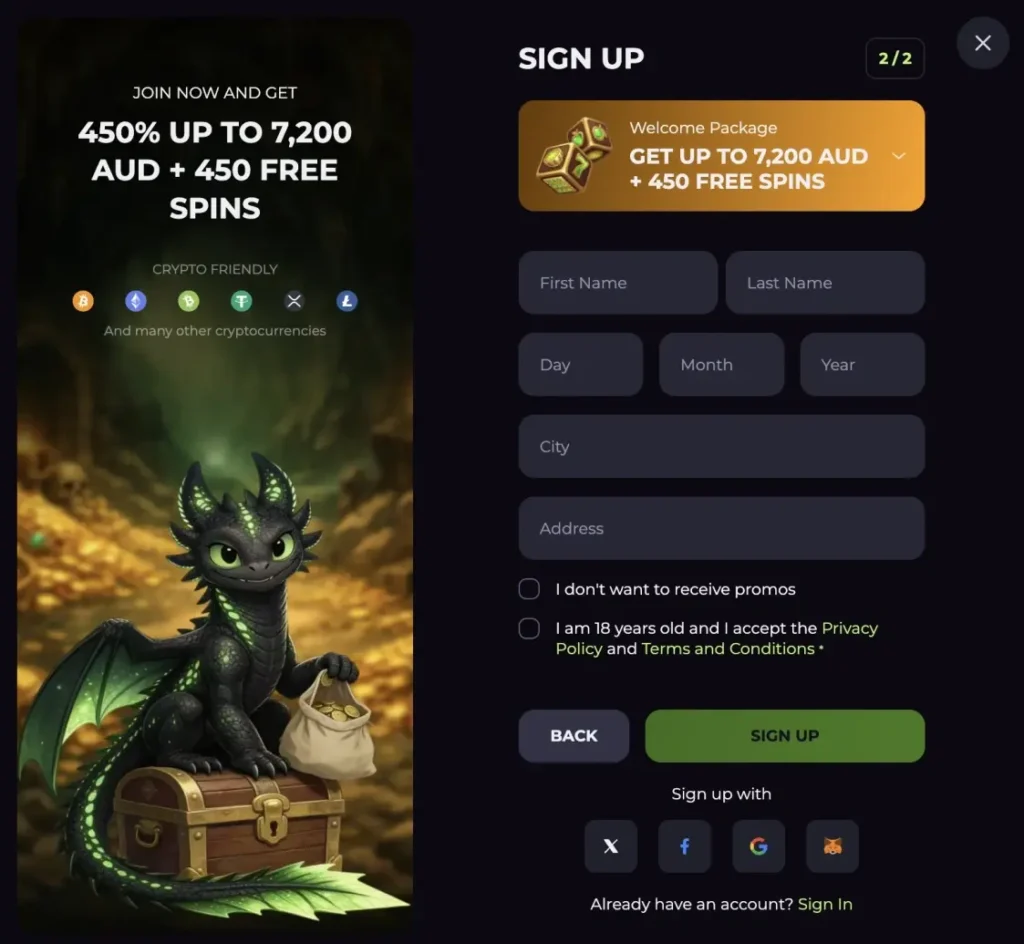
It takes 3 minutes to sign up, and you only need your name, username, address and password to access 9,000+ games and the cashier.
- Choose your username and password: Open the website and click the “Sign Up” button. Enter your email as your username and create a password.
- Choose your country and currency: These fields are usually prefilled. But confirm the details. Change your currency to AUD instead of using the default EUR.
- Enter personal details: Click Next to move to page 2 of the Drakaris sign up form. Enter your name, date of birth, city and address.
- Accept terms: If you are 18 or older, check the box confirming your age and click the “Sign Up” button.
Requirements for Drakaris Registration in 2026
Registration is open to Aussies who are at least 18 years old. Here are other key requirements:
- Name: The casino requires users to provide their official names as they appear on their government-issued ID.
- Date of birth: You need to share your date of birth. The casino uses this to confirm whether you meet the minimum age requirement for Aussies to join the site.
- City and Address: These details should match the residence documents you will share during account verification.
- Accept terms: You cannot complete the Drakaris sign up without submitting terms.
Casino Account Verification
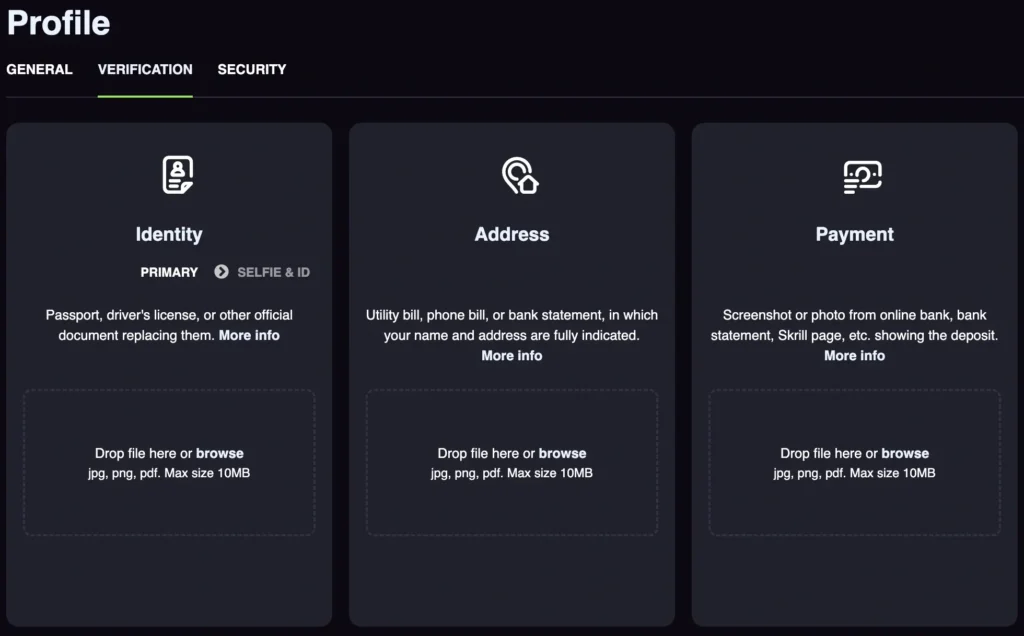
At the casino, account verification is designed to verify player identity as required by the Tobique Gaming Commission. The process involves uploading identity documents and the casino may request a phone call. Account verification can be triggered at any time, even after completing your Drakaris registration. However, it often happens when you request your first payout. You have up to 2 weeks to upload the documents, otherwise, your payout will be cancelled and your account suspended. Drakaris will verify your documents within 72 hours.
Your documents may get rejected if they are blurry or if they don’t match your account name and address. The casino will send an email with the reason your documents got rejected. Commit to submit them soon. To verify:
- Complete the Drakaris Casino login.
- Go to your profile and open the verification tab.
- Upload your valid photo ID, a photo of your payment method and a photo of documents with your current address.
Drakaris Login Process
Your account remains secure behind a username and password. Players need to submit their credentials, which should match the details stored on the casino’s server for the sign-in to be successful. Here is the Drakaris Casino login process:
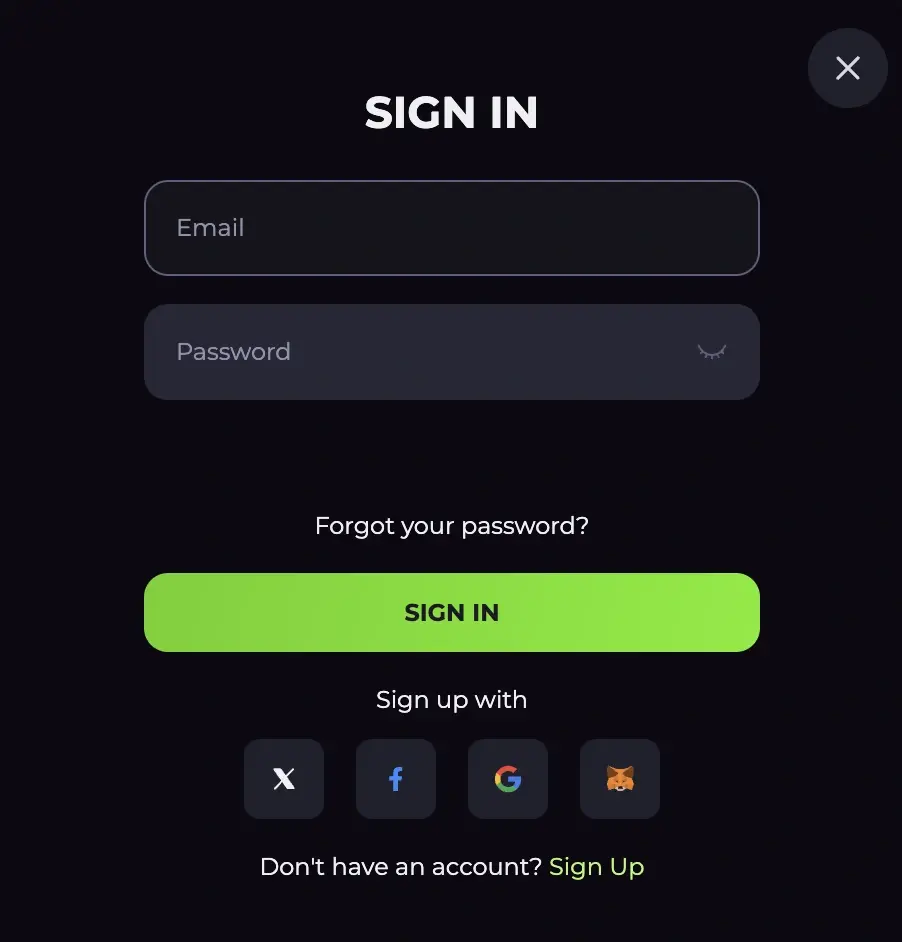
- Go to the login form: Click the “Sign In” button at the top of the screen.
- Username entry: Type your email.
- Enter your password: Type your 8-character password.
- 2FA Authentication: If you are using 2FA to reinforce your account security, get the code and enter it to authenticate the login.
Click the Drakaris login button to enter your account. You should gain entry into your account if your username and password are correct. In case you run into an issue, try some of the solutions shared further below.
Drakaris Casino Login via Mobile App
You can join the casino via mobile browser or app. If you registered your account on a desktop, you don’t need to create another one. You can sign in with the same details you use on desktop devices.
- Open the app: Download the PWA on your iOS or Android device from Drakaris’ official website. Open it.
- Enter credentials: The Drakaris login button is on the top-right side. Tap to open the login form. Enter your email and password.
- Sign in: Click the “Sign In” button to submit your form.
Personal Details
This gambling provider understands the importance of protecting your personal data. Thus, they collect, use and store personal data in compliance with the Personal Information Protection and Electronic Documents Act and the General Data Protection Regulation (GDPR). The casino collects Drakaris Casino login, identity data, contact information and financial data. They also collect technical data like IP address, OS and browser type.
While collecting all this data, the operator ensures data safety via 256-bit SSL encryption. Even after deleting your account, the site is required to keep your personal details for a minimum of 5 years. Players are expected to keep their details confidential to prevent unauthorised access.
Possible Drakaris Login Issues for New Players
When logging in at the online casino, you may run into a problem. Here are common Drakaris Casino login issues and their solutions:
| Possible Issues | Solutions |
|---|---|
| Forgotten password | When you can’t remember your password, you can reset it. Click the “Forgot your password” link on the login form. Enter your email and open the link sent to your email to create a new password. |
| Geo blocks | If using a VPN, disable it and sign in again. |
| Inactivated account | You need to activate your account by opening the link sent to your email a few seconds after completing the Drakaris sign up. |
| Suspended account | Your login credentials can be correct. However, you can get a pop-up message that your account is suspended. Check your email to find out why your account is suspended. Contact customer support to get solutions for recovering your account. |
How to Delete Account?
Players can delete their account instead of leaving it dormant for months. If you just want to take a break, use the self-exclusion tool under your account. Once you delete your profile, you cannot log back in using the same Drakaris login details or access your account. Here is the process:
- Withdraw funds: Withdraw all the money in your account.
- Contact customer support: Send a message to the customer support team. Your message should be clear that you want to delete your account.
- Wait for the confirmation message: Wait for an email confirming your account is closed.